
Short answer
To connect MarQet BI to Claude, copy your MarQet BI MCP server URL from account settings, then in Claude go to Settings → Connectors → Add custom connector, paste the URL and sign in with your MarQet account. Claude can then query your live MarQet BI data, such as revenue, ad spend, shipping performance and RTO, in any conversation.
Key takeaways
- MCP (Model Context Protocol) lets AI assistants query live data sources securely.
- MarQet BI exposes an MCP server, so Claude answers from your real connected data.
- You sign in with your MarQet account; Claude sees only what your account can see.
- Best for founders and operators who already use Claude every day.
If you already ask Claude for help with plans, emails and analysis, you can now ask it about your business numbers directly. MarQet BI's MCP connector lets Claude read your live MarQet BI data instead of guessing from a pasted export.
What MCP is
The Model Context Protocol (MCP) is an open standard that lets AI assistants connect to external tools and data sources. A service exposes an MCP server; the assistant connects to it and can call its tools, with your permission and sign-in.
What the MarQet BI connector does
MarQet BI exposes an MCP server URL. Once connected, Claude can query your MarQet BI data (revenue, ad spend, shipping performance, RTO and blended dashboard metrics), grounded in the platforms you've already connected, such as Shopify, Shiprocket, Google Ads and Meta Ads.
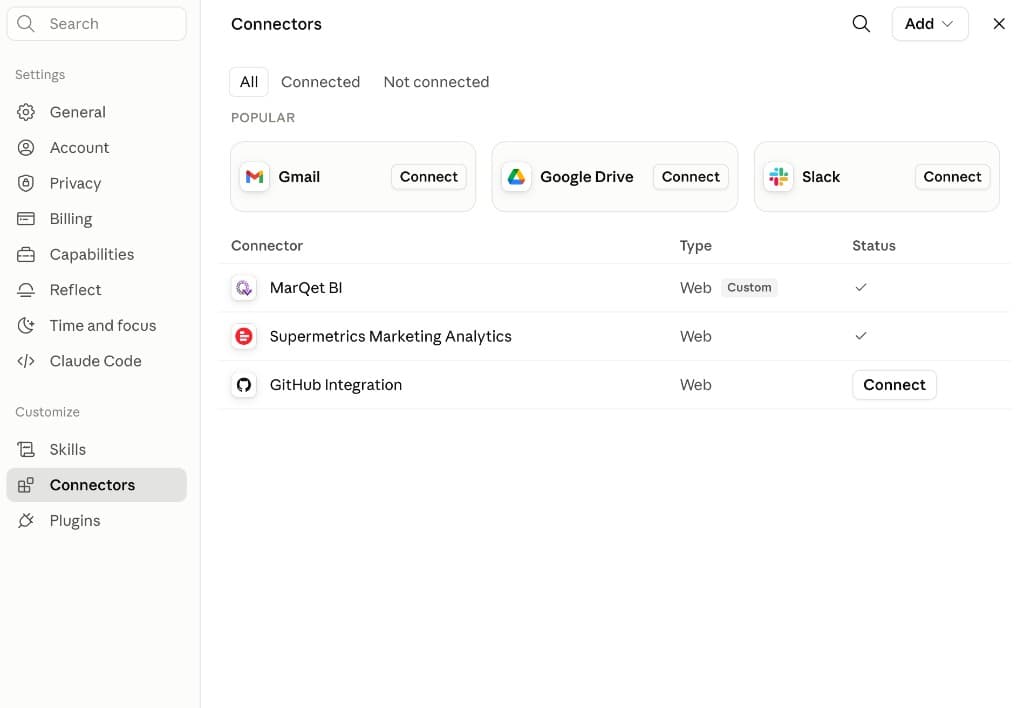
How to set it up
- 1
Connect your data in MarQet BI
Sign in to MarQet BI and connect your sources (Shopify, ads, Shiprocket and so on).
- 2
Copy your MCP server URL
Find it in MarQet BI account settings.
- 3
Add a custom connector in Claude
In Claude, go to Settings → Connectors → Add custom connector. Paste the MarQet BI MCP URL and save.
- 4
Sign in
Claude prompts you to sign in with your MarQet account.
- 5
Ask away
MarQet BI appears in your connector list and can be used in any conversation.
Claude's menus change from time to time. If the labels differ, look for the connectors or integrations section in Claude's settings.
What to ask
| Question | What Claude uses |
|---|---|
| What was net revenue last week vs the week before? | Shopify revenue in MarQet BI |
| Which campaign had the best ROAS this month? | Meta and Google Ads data |
| Why did RTO spike in the last 7 days? | Shiprocket shipment outcomes |
| Which products are running low on cover? | Inventory and sales data |
| Summarise this week for my co-founder in five bullets | Blended dashboard metrics |
Security and access
You authenticate with your MarQet account, so Claude can only access data your account can see in MarQet BI. You can remove the connector from Claude at any time.
When to use Claude vs the MarQet BI app
Use the MarQet BI app for the morning list, saved reports and exports. Use Claude when you're already working there and want a quick answer or a written summary built from live numbers.
Frequently asked questions
What is the MarQet BI MCP connector?
An MCP server that lets Claude query your live MarQet BI data, including revenue, ad spend, shipping performance and RTO, after you sign in with your MarQet account.
Do I need a MarQet BI account to use MCP?
Yes. The connector uses your MarQet BI account and the data sources connected to it. Ask the MarQet team during onboarding if you don't see the MCP URL in settings.
How do I add a custom MCP connector in Claude?
In Claude, open Settings, go to Connectors, choose to add a custom connector, paste the MCP server URL and complete sign-in.
Sources and further reading

Written by
Ayush Singhal, Founder, MarQetAyush founded MarQet to give D2C founders one system for customer conversations, daily performance and quick-commerce shelf availability.